From Click to Counter:
Building a Better Customer Journey for Online Firearm Buyers
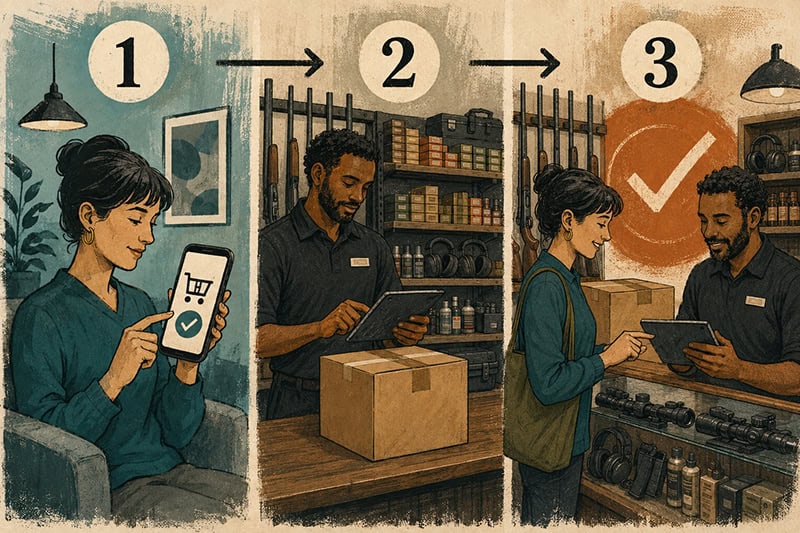
A customer orders a firearm online and watches the tracking like a kid watching the clock on the last day of school. The carrier marks it delivered, so the customer heads over. At the store, staff have not finished checking in the firearm and matching it to the customer’s transfer. The customer is frustrated. Your employee is pulled from other work. The experience has already gone sideways.
This isn’t only a transfer problem. It’s a customer-journey problem.
As Shooting Industry reported in “Fair Weather Buyers,” summer foot traffic softened as more consumers headed online. Firearms, however, create an opportunity. The order may be placed online, but the customer generally still completes the transfer through a receiving FFL. Even when you did not win the original order, you may control the most memorable part of the experience.
Set Expectations Before the Shipment Arrives
The journey starts when a customer selects your business as the receiving dealer. Make that decision easier with a transfer page that answers the questions customers have: What is the fee? Do you accept shipments from nonlicensees, or only from FFLs? Is an appointment required? What are your transfer hours? How long does intake typically take after delivery? When should the customer contact you?
Publish current, location-specific instructions instead of relying on a vague line about “required documents.” State and local requirements and store policies vary. Describe the process.
If you handle regular inbound transfers, add a short intake form for the customer’s name as it appears on the order, contact information, seller or shipping FFL, order number and tracking number when available. Send an automatic confirmation. That small step connects an incoming firearm shipment to the correct customer before anyone starts playing detective in the receiving area.
“Delivered” Is Not “Ready”
Carrier tracking describes the shipment’s journey. It does not describe yours.
Use a status sequence customers cannot misread: transfer information received; firearm shipment delivered and intake in progress; firearm ready for the customer to come in and begin the transfer process. That final notice should include transfer hours, fee, appointment policy, location-specific instructions and any applicable storage deadline or fee. Keep it mobile-friendly.
Assign ownership to the receiving process, too. One person or role should receive the shipment, match it to the transfer record, update the status and trigger the customer notice. Clear ownership keeps an inbound transfer from becoming everybody’s job and nobody’s priority.
Many firearms-specific POS and transfer-management systems can send these updates by email or, with the customer’s prior consent, text. A smaller shop can do the same with saved templates and a staff checklist. Consistency matters more than technology.

Don’t Make Them Start Over at the Counter
When the customer arrives to begin or complete the transfer process, your employee should be able to locate the firearm and transfer record quickly and know what the customer has already been told.
Do not treat the customer like an inconvenience because the firearm was ordered elsewhere. For many online buyers, this is their first real interaction with your business. A smooth transfer can do more for future sales than a lecture about why they should have bought locally.
Once the transfer is complete, ask one useful question: “Do you already have everything you need to use and store it safely?” Depending on the customer and firearm, the answer may lead naturally to secure storage, ammunition, a holster, cleaning supplies, optics installation, range time or training. It is service first, with revenue attached.
Follow Up Without Following Them Around
Keep routine transfer updates focused on the transfer, and do not treat consent to receive those updates as consent to marketing. Before sending promotional texts, obtain and document the consent required for that campaign, honor opt-outs and comply with applicable federal and state sending restrictions. Use a provider experienced in firearm-industry messaging to meet carrier requirements for campaign registration and age-gating. Because these rules move quickly, have counsel review the workflow before launch.
Then make the follow-up relevant. A few days after the completed transfer, an opted-in customer might receive one practical next step: a beginner class, range orientation, optics-zeroing service or secure-storage resource. Keep subject lines and lock-screen previews discreet. A helpful message need not announce the contents of someone’s safe.
Start with a 15-minute test: find your transfer instructions on a phone, send a test status message and ask an employee to locate a newly received transfer. Then track delivery-to-intake time, “Is it ready?” calls, days from the ready notice to the completed transfer, add-on sales and return visits. Those numbers will show where friction remains and whether transfers are becoming relationships.
The online seller may have won the order. The receiving FFL can still earn the relationship.
Get The Dealer Advantage Every Week!
By submitting this form, you are consenting to receive marketing emails from: . You can revoke your consent to receive emails at any time by using the SafeUnsubscribe® link, found at the bottom of every email. Emails are serviced by Constant Contact